Reverse Image Search for the Epstein Files
Drop a photo, find the scene. Drop a face, find the person. 614,700 images from the DOJ production, indexed and searchable.

A new tool just went live on epstein-data.com this week: Reverse Image Search. Drag any photo into the page and it returns the closest visual matches across the entire DOJ Epstein Files images: every photo, ID card, surgery slide, message-in-a-bottle, snapshot, art piece, and wall calendar that the Department of Justice released, plus what the House Oversight Committee, the FBI Vault, and the U.S. Virgin Islands have published on top.
It runs in two modes:
Image / Scene: the OpenAI CLIP model converts your image into a list of 768 numbers, and finds its nearest neighbors among ~614K images. It matches by content, not pixels: a different angle of the same room, a different photo of the same airplane, a different copy of the same form. Cosine similarity is reported per result (vaguely analogous to ‘percent match’, it goes from -1 to 1 with higher being more similar).
Face: InsightFace ArcFace runs face detection + embedding on every face in the corpus (29,128 face crops), and your upload is searched against that index. If you upload a photo with one or more faces, the page will quietly ask whether you want to switch to Face mode.
You can drag-drop, click to upload, or paste from clipboard (Ctrl/⌘+V). The minimum-similarity slider controls how far down the result list you see, and you can sort by similarity or by EFTA number. Each result has a “search like this” button (⤴): one click pivots into a new search using that image as the query.
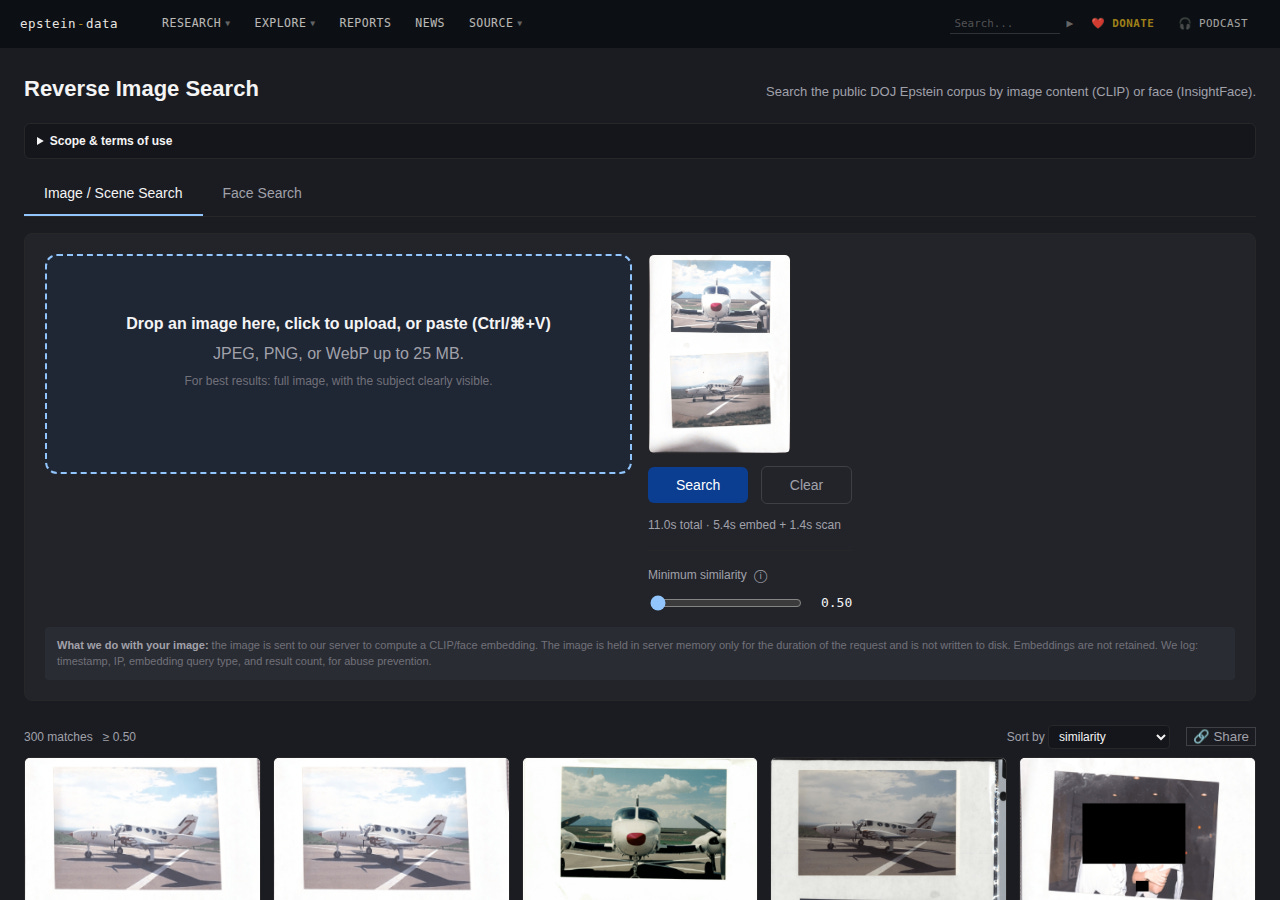
The reverse image search page after uploading the Zorro Ranch airstrip photo. CLIP returns the visually closest matches across 614K corpus images. Try this exact query →
What it’s for
I built this for two specific use cases.
1. Verifying claims. When someone tweets a photo “from the Epstein files,” there was previously no way for a normal person to check. Now there is: drop the image, see if anything close to it actually appears in the production. If it does, you’ll get the EFTA number and the source PDF. If it doesn’t (if every match scores below 0.75) that’s a finding too. The Epstein Files have become a meme container; AI-generated and photoshopped content gets attributed to the production constantly. This tool is one more way to push back on that.
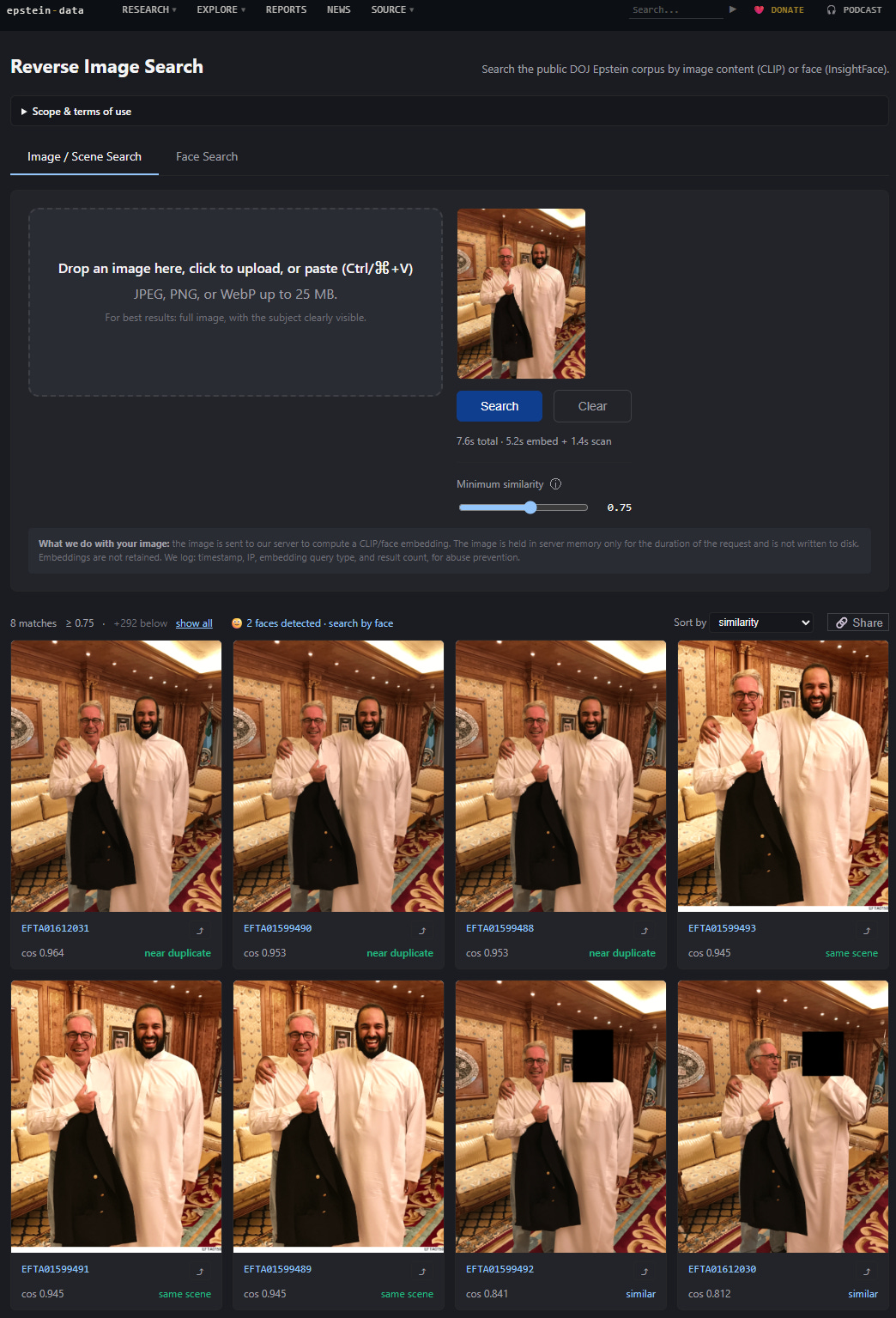
2. Finding the same scene across the corpus. The DOJ released the same photographs over and over: the same flight log scanned in different productions, the same redacted ID card filed in different cases, the same building photographed from five angles in three different folders. Image search finds those clusters automatically. The cosine score gives you an honest read on how related two images actually are: 1.000 is a near-pixel-perfect duplicate, 0.95+ is the same image rescanned, 0.85+ is “same scene different angle,” and below 0.7 it starts to be “looks vaguely related.”
Privacy
The query image you upload is not stored. The server holds it in memory only long enough to compute the embedding, then drops it. What gets logged: timestamp, IP, query type (image vs. face), and number of results returned — that’s it, and solely for abuse prevention.
When you click Share on a result page, the URL becomes something like /find-image?q=5cce5afb398df66a. That string of letters and numbers at the end is called a “hash key,” which lets the system look up the query in a table that stores the embedding vector (a bunch of numbers, not the original image). Anyone who opens the link gets the same results, but cannot reconstruct what you uploaded. This was the easiest way to make the tool shareable without becoming an image host.
Coverage and caveats
The index covers every photo we have indexed to date: the full DOJ EFTA production (DS1–DS12), the House Oversight images and PDFs released in the December and January tranches, the FBI Vault releases, and the U.S. Virgin Islands’ “Epstein Documents” page. It does not cover documents we don’t have, and it does not cover text-only scans (emails, etc). The Oversight Democrats received 95,000 photos from the Epstein estate on December 12, 2025; as far as I can tell, only some of those photos have been released publicly, in batches. Working on it.
CLIP is excellent at scenes, objects, settings, and document layouts. It is not a face-matching system: that’s what the Face tab is for. Face Search uses ArcFace and works on faces large enough to be detected (roughly, the eyes need to be at least a few pixels apart in the original page); a face that is 12 pixels wide on a fax-quality scan will not match with any fidelity.
False positives are normal. A photo of a private jet on a runway will return every photo of a private jet on a runway, not just Epstein’s. Read the cosine score. Use the “search like this” button to triangulate if you’re not sure.
How to use it
Go to epstein-data.com/find-image.
Drag, paste, or click to upload an image. JPEG/PNG/WebP up to 25 MB.
If the image has a face, you’ll get a one-click prompt to switch to Face Search.
Move the slider to widen or narrow the match set. Sort by similarity (default) or EFTA number.
Click any result thumbnail to open the full document on epstein-data.com. Click the
⤴to pivot the search.Click Share to get a URL that anyone can open without you re-uploading the image.
The link is in the site’s main navigation under Research → Reverse Image Search, and on the homepage. This is free to use, but not entirely free for me to run. Donations and paid subscriptions are deeply appreciated but grant you no additional information beyond what I post here and, on the site, so the benefits of what I’ve done can be maximized.
This tool is one piece of a larger project: building a public, searchable index of the Epstein Files that does what the DOJ’s own justice.gov/epstein site does not. If it’s useful, share it. If you find something interesting, tell me.
Wow so useful! Thank you.
You kick ass Rye, amazing work!!